

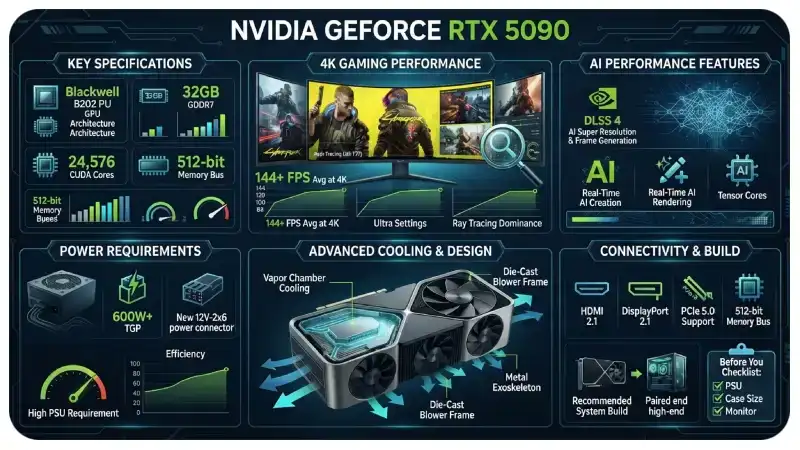
The NVIDIA GeForce RTX 5090 is designed for users who want extreme graphics performance without compromising on features. Built on NVIDIA’s Blackwell architecture, this flagship GPU combines a large amount of GDDR7 memory, high memory bandwidth, advanced ray tracing, and AI-powered rendering technologies.
It targets more than traditional gaming. The card also appeals to 3D artists, video editors, AI enthusiasts, developers, and other users who regularly run demanding workloads.
But raw specifications do not tell the whole story. The RTX 5090 uses substantial power, requires a capable PC, and makes the most sense when paired with a high-resolution display or demanding professional workload.
This guide covers its specifications, gaming performance, features, power requirements, practical uses, and the type of user who can actually benefit from it.
What Is the NVIDIA GeForce RTX 5090?
The NVIDIA GeForce RTX 5090 is the flagship consumer graphics card in NVIDIA’s RTX 50 Series. It uses the Blackwell GPU architecture and includes 32GB of GDDR7 memory. NVIDIA positions it as its most powerful GeForce graphics card, targeting both gamers and creators.
The card launched with a $1,999 starting price in the United States. Actual retail pricing can vary significantly depending on the manufacturer, region, availability, and market conditions.
Unlike a mid-range GPU designed mainly for 1080p gaming, the RTX 5090 is built for workloads where graphics processing power matters. That includes 4K gaming, heavy ray tracing, AI-assisted applications, high-resolution video production, and complex 3D projects.
NVIDIA GeForce RTX 5090 Specifications
Here are the key specifications of the standard RTX 5090:
| Specification | RTX 5090 |
|---|---|
| Architecture | NVIDIA Blackwell |
| GPU | GB202 |
| CUDA Cores | 21,760 |
| VRAM | 32GB GDDR7 |
| Memory Interface | 512-bit |
| Memory Bandwidth | 1,792 GB/s |
| Ray-Tracing Cores | 170 |
| Tensor Cores | 680 |
| Total Graphics Power | 575W |
| Launch Price | $1,999 |
| Launch Date | January 2025 |
NVIDIA’s official specifications confirm the 32GB GDDR7 configuration and 512-bit memory interface, with memory bandwidth reaching 1,792 GB/s.
That combination gives the card considerable memory capacity and bandwidth for demanding graphics and compute workloads.
Blackwell Architecture Explained
One of the biggest changes behind the RTX 5090 is NVIDIA’s Blackwell architecture.
Blackwell is designed around a combination of traditional GPU processing and specialized hardware for AI workloads. This matters because modern games and creative applications increasingly use AI-based technologies.
The RTX 5090 includes dedicated Tensor Cores for AI processing and Ray-Tracing Cores for accelerating realistic lighting calculations.
For gamers, this hardware helps support features such as advanced ray tracing and NVIDIA’s DLSS technology.
For creators and developers, the same hardware can accelerate certain AI, rendering, image-generation, and compute workloads.
32GB of GDDR7 Memory
The RTX 5090 includes 32GB of GDDR7 VRAM, which is one of its most important practical advantages.
Modern games can consume significant amounts of graphics memory when you combine 4K resolution, high-quality textures, ray tracing, and large game worlds.
The extra memory can also help with professional workloads.
For example, a 3D artist working with large scenes may need more VRAM when using detailed textures and complex models. Similarly, AI users can benefit from additional graphics memory when working with larger models that fit within the available VRAM.
The card also has a 512-bit memory interface and 1,792 GB/s of memory bandwidth.
RTX 5090 Gaming Performance
Gaming performance is where the RTX 5090 becomes particularly interesting.
Independent testing from Tom’s Hardware found the RTX 5090 was approximately 25% faster than the RTX 4090 at 4K Ultra in its rasterization test suite. Performance varied considerably between individual games, however.
That distinction is important.
The RTX 5090 does not provide the same level of advantage in every resolution. At lower resolutions, CPU limitations can reduce the benefit of an extremely powerful GPU.
At 4K, however, the GPU has much more work to do. That allows the RTX 5090’s additional processing power to make a larger difference.
Why 4K Makes More Sense
Imagine two gaming PCs using the same RTX 5090.
The first uses a 1080p 60Hz monitor.
The second uses a 4K 240Hz display.
The second system gives the GPU a much more demanding workload. In that environment, the RTX 5090’s performance has a clearer purpose.
This is why buying the fastest GPU available does not automatically make sense for every gamer. Your monitor, games, CPU, and target frame rate all influence how much performance you can actually use.
Ray Tracing Performance
Ray tracing simulates how light interacts with objects in a virtual environment. It can improve reflections, shadows, global illumination, and other lighting effects.
The RTX 5090’s dedicated Ray-Tracing Cores help accelerate these calculations.
This becomes especially useful in games that support demanding ray-tracing or path-tracing effects.
Without dedicated hardware, rendering these effects can place a heavy workload on the GPU. NVIDIA combines its hardware with AI-based technologies to help maintain playable frame rates while preserving visual quality.
For players who prioritize maximum graphics settings, the RTX 5090 provides considerable headroom for demanding ray-traced games.
DLSS and AI-Powered Rendering
DLSS is another major part of the RTX 5090 experience.
Instead of rendering every frame entirely at the monitor’s native resolution, supported games can use AI-based techniques to reconstruct a higher-resolution image from a lower-resolution input.
This can improve performance while maintaining strong image quality.
The RTX 50 Series also introduces newer AI-based rendering capabilities through Blackwell’s Tensor Core hardware.
The practical benefit is simple: you can often enable demanding graphical effects without accepting the same performance penalty that traditional rendering would produce.
However, results depend on the individual game. DLSS support, implementation quality, and available modes vary between titles.
RTX 5090 for 4K Gaming
If your main goal is 4K gaming, the RTX 5090 is built for this type of workload.
It can handle demanding games with high-quality textures, advanced lighting, and ray tracing. Independent benchmark testing also shows that its advantage over previous-generation hardware becomes more visible at 4K.
A sensible high-end setup could include:
- RTX 5090
- Modern high-performance CPU
- 32GB or more system RAM
- Fast NVMe SSD
- High-refresh-rate 4K monitor
- High-quality power supply
- Strong case airflow
The exact CPU and PSU choice depends on the rest of the system, but pairing an extremely powerful GPU with an entry-level processor can create unnecessary performance limitations.
RTX 5090 for Content Creation
Gaming is only one use case.
The RTX 5090 can also benefit professionals working with:
- 3D rendering
- Video editing
- Motion graphics
- Animation
- AI applications
- Image generation
- CAD and visualization
- Large creative projects
The 32GB VRAM capacity can be particularly useful when applications need to keep large datasets, textures, models, or scenes in GPU memory.
For example, a 3D designer working on a large architectural scene can benefit from additional VRAM when using high-resolution textures and complex geometry.
Video editors can also benefit when working with demanding effects, high-resolution footage, and GPU-accelerated workflows.
Actual performance varies by application, so professionals should check benchmarks for their specific software before buying.
RTX 5090 Power Requirements
Performance comes with a major power requirement.
The RTX 5090 has a 575W total graphics power rating, making power supply planning an important part of the build.
A high-end card like this also produces substantial heat under heavy workloads.
That means you should consider:
- A high-quality power supply.
- Proper power-cable installation.
- Adequate case airflow.
- Sufficient CPU cooling.
- Enough physical space for the graphics card.
Do not choose a power supply based only on the GPU’s advertised wattage. Your CPU, storage, fans, pumps, and other components also consume power.
NVIDIA and board partners should be consulted for the exact PSU recommendation for the particular RTX 5090 model you plan to purchase.
RTX 5090 Size and System Compatibility
The Founders Edition and partner cards can differ significantly in physical dimensions.
Before purchasing one, measure your PC case.
Check:
- Maximum GPU length
- GPU thickness
- Available PCIe slots
- Power connector clearance
- Front radiator clearance
- Airflow around the graphics card
This is especially important in compact cases.
A card can technically fit inside a case while still leaving insufficient space for proper airflow or cable management.
Who Should Buy the RTX 5090?
The RTX 5090 makes the most sense for users who have a specific reason to need extreme GPU performance.
4K Enthusiast Gamers
If you use a high-refresh-rate 4K monitor and want maximum graphical settings, the RTX 5090 can provide the performance headroom you’re looking for.
Professional Creators
Video editors, 3D artists, animators, and other professionals may benefit from its large VRAM capacity and GPU compute performance.
AI Enthusiasts
The combination of 32GB VRAM and dedicated Tensor Core hardware makes the card interesting for certain local AI workloads.
However, professional AI users should compare it with workstation products based on their memory requirements, software compatibility, reliability needs, and budget.
Users Keeping a PC for Several Years
A large amount of VRAM and strong processing capability can provide additional headroom as software becomes more demanding.
That does not guarantee future-proof performance, but it can reduce some limitations associated with insufficient graphics memory.
Who May Not Need an RTX 5090?
The RTX 5090 is not automatically the right choice for every gaming PC.
If you mainly play competitive games at 1080p, a less expensive GPU may make more sense.
The same applies if you use a 1440p monitor with moderate graphics settings and do not need extremely high frame rates.
Independent GPU testing shows that the RTX 5090’s advantage becomes more pronounced at higher resolutions, while CPU limitations can reduce the benefit at lower resolutions.
In other words, your workload should determine your GPU budget.
RTX 5090 vs. RTX 4090
The RTX 5090 succeeds the RTX 4090 as NVIDIA’s flagship GeForce GPU.
The newer card brings Blackwell architecture, 32GB of GDDR7 memory, and significantly higher memory bandwidth.
The RTX 4090 remains capable hardware, but the RTX 5090 provides a stronger platform for users who want maximum 4K performance and newer Blackwell features.
The difference is not identical in every game. Benchmark results vary depending on resolution, game engine, CPU, settings, and whether ray tracing or AI features are enabled.
Is the NVIDIA GeForce RTX 5090 Worth It?
The answer depends on what you expect from your PC.
If you want a graphics card for basic 1080p gaming, its enormous performance level may be unnecessary.
If you are building a high-end 4K gaming system, creating complex 3D projects, or running demanding GPU-based workloads, its capabilities become much easier to justify.
Price also matters. The official launch price was $1,999, but actual market prices can differ substantially. Current availability and retailer pricing should therefore be checked before purchasing.
Final Thoughts
The NVIDIA GeForce RTX 5090 is a flagship GPU built around an ambitious combination of traditional graphics processing and AI acceleration.
Its 21,760 CUDA cores, 32GB of GDDR7 memory, 512-bit memory interface, and 1,792 GB/s bandwidth give it the hardware needed for extremely demanding workloads.
Its biggest practical strengths appear when you push beyond ordinary gaming workloads. 4K gaming, ray tracing, high-resolution content creation, 3D rendering, and selected AI applications can take advantage of the card’s enormous processing and memory resources.
The trade-offs are equally important: high power consumption, demanding cooling requirements, expensive system components, and a price that makes little sense for users who do not need flagship-level performance.
For the right PC, though, the RTX 5090 provides an impressive amount of graphics and compute headroom and represents one of the most capable consumer GPUs in its generation.




Leave a Reply